Primary assets are the things that directly create value for your business and must be protected first. These are usually information, business processes, or services that deliver core business value to customers (products, services, critical data, customer-facing processes). Everything else (hardware, software, networks, people, facilities, vendors) are supporting assets that enable primary assets to function.
Because primary assets keep the business running, companies must protect them to avoid downtime and loss. In information security and cybersecurity, they are the top priority because they are essential to the business. If they are lost, stolen, or misused, they can create serious business risk.
- Primary assets drive business outcomes and sit at the top of the value chain
- Primary assets include information assets, customer-facing services, or production processes/technologies critical to the company’s survival
- Supporting assets enable primary assets to operate—without them nothing works, but they are not why the company exists (internal processes, IT infrastructure, HR systems, etc.)
See here how to identify your primary assets.
Examples of primary assets
- Personal customer data
- Login data
- Backup of data
- Business plans
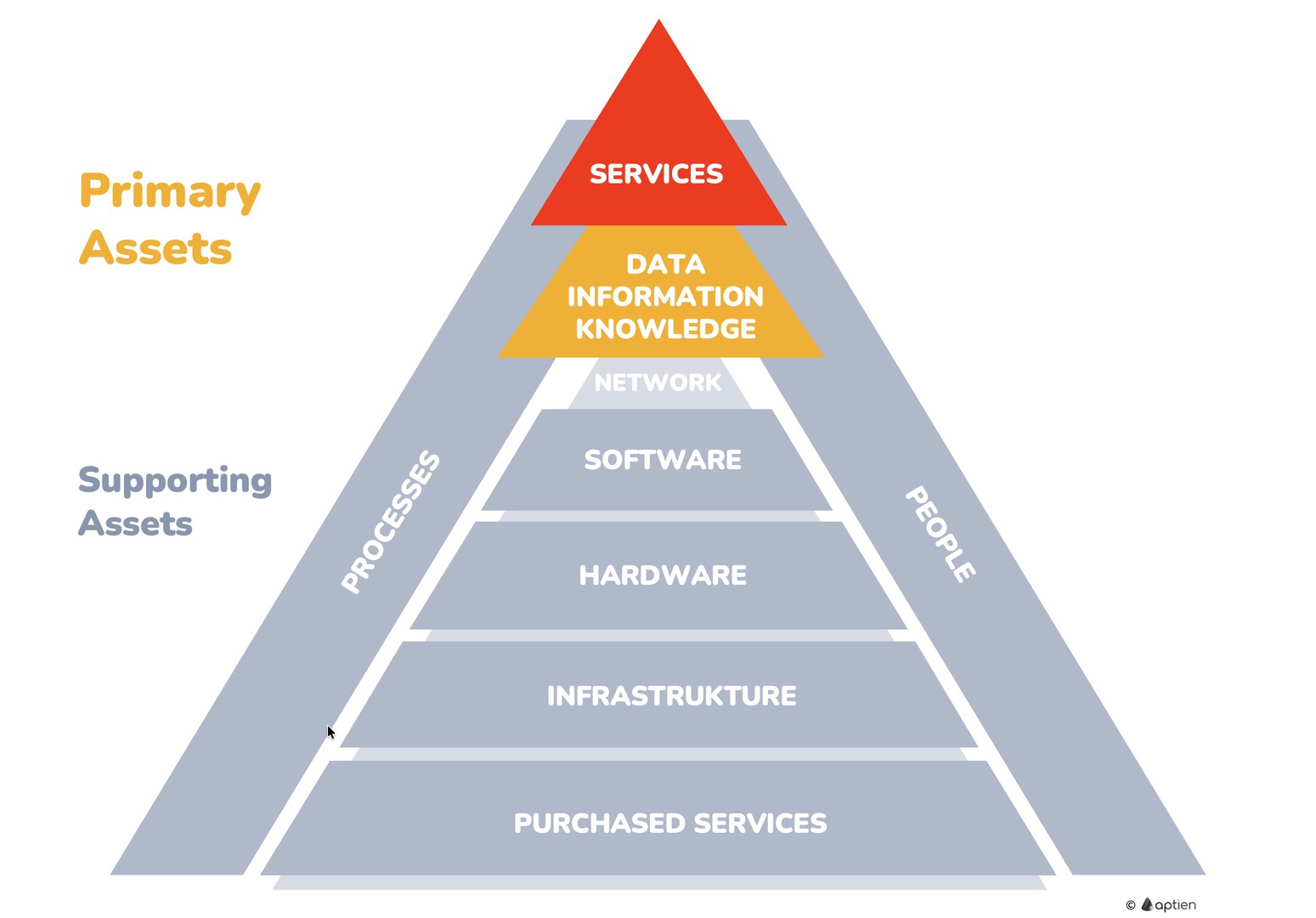
Operation Dependencies on supporting IT Assets
Assets are not a single flat list. They vary in importance and have dependencies. The loss of one asset can reduce the value of another asset. They also depend on supporting assets. For example, a data center outage or fire can take down applications and the data stored in them. You need to protect not only software at the level of cybersecurity (against cyberattacks) but also the data center and facilities at the level of physical security (against fire, theft, flooding).
- Supporting information assets are everything that enables primary assets to exist and operate: software, hardware, physical infrastructure, supporting services, and people.
- Software: all software and applications where data is stored or processed.
- Hardware: servers and other IT or business equipment that runs the software.
- Networks and communications infrastructure: enable secure data transmission.
- Physical infrastructure: rooms and facilities, physical equipment, and locations (for example, a server room or data center) where hardware or network infrastructure is housed.
- People: carriers of knowledge and information, and also a potential source of risk or failure.
- Purchased services and processes: IT and outsourced services, such as cloud storage, internet connectivity, or electricity supply.
How to Keep an Primary Asset Inventory
Creating the asset inventory is one of the first actions for information security management. The inventory is the essential foundation for other information security data. The information asset inventory should be validated regularly by the management and the asset owners.
- for keeping an information asset inventory, use Information asset organizers for primary and supporting assets
- maintain an overview of information assets, divided according to the above methodology or according to your own methodology
- for each asset, you keep key information such as type, confidentiality, etc.
- you can link each individual asset to others to keep them related
- the inventory should be updated when additional assets are uncovered.