Check-list for employee onboarding is a list of specific tasks and activities that need to be completed during the first days of a new employee – from day one up to about 2 weeks, or the first 3 months. It helps ensure that nothing important is forgotten. It helps make sure the new team member receives everything needed – from work equipment to training – and that their onboarding goes smoothly.
K čemu potřebují firmy onboarding checklist?
- Pomáhá HR, IT i manažerům vědět, co má kdo kdy připravit nebo udělat při nástupu
- Zjednodušuje spolupráci personalisty, s dalšími (office manažer, IT, Facility)
- Minimalizuje zmatky první den a pomáhá standardizovat proces nástupu zaměstnance
- Zvyšuje spokojenost a jistotu nového zaměstnance
New Hire Onboarding Checklist (Template)
Pre-Start Activities (Offer Acceptance to Day 1)
- Confirm start date, location (onsite/remote/hybrid), and working hours
- Send welcome/onboarding email: what to bring, where to go, when to arrive, point of contact, dress code
- Prepare agreements and documents (offer letter, NDA, handbook/policies, confidentiality/GDPR, W‑4/I‑9 if applicable)
- Add to payroll and benefits systems
- Provide org info: org chart, team overview, who’s who
- Schedule required training: safety/OSHA, compliance, privacy, code of conduct
- Arrange building access / badge / keys (if applicable)
- Laptop/phone + charger, headset, dock, monitor
- Create email and accounts (SSO, Google Workspace/Microsoft 365, Slack/Teams, VPN…)
- Set roles and permissions based on position
- Prepare security onboarding (2FA/MFA, password manager)
- Add to internal groups (mailing lists, channels)
- Prepare agenda for the first 5 workdays
- Set expectations and goals for 30/60/90 days
- Assign a buddy/mentor and schedule regular check-ins
- Plan 1:1s (first week, then weekly cadence)
- Prepare a first task (small, meaningful, achievable)
First Day (Day 1)
- Welcome and orientation; company overview and culture
- Office tour (or remote setup walkthrough)
- Introductions to the team and buddy
- Basic policies: safety, time & attendance, communication
- Issue equipment and access + sign equipment receipt
- Set up email and core tools
- Set passwords and verify access (MFA, password manager, VPN)
- Role overview: expectations and priorities
- First mini-task (e.g., profile setup, mandatory training, first ticket)
- End-of-day check-out (what worked / what’s missing)
First Week
- Overview of key processes (how work gets done, escalation paths)
- Intro to projects / customers / internal initiatives
- Access to documentation + guidance on where to find information
- Key contacts list: IT, HR, Finance, Facilities, Security
- Job-specific training (tools, workflows, standards)
- Culture norms: communication, meetings, expectations
- First team meeting / standup / onboarding session
- Manager: weekly 1:1s + confirm goals and priorities, set 30‑day milestones, assign first real deliverable
30-60-90 Days
- At the end of each period (30/60/90): performance check-in—what’s working, blockers, needed support
- Verify completion of training and compliance checklist
- Onboarding feedback (short survey + quick conversation)
- Increase responsibility / assign ownership of a small area
- Set performance expectations and a simple development plan
- Define goals for the next quarter
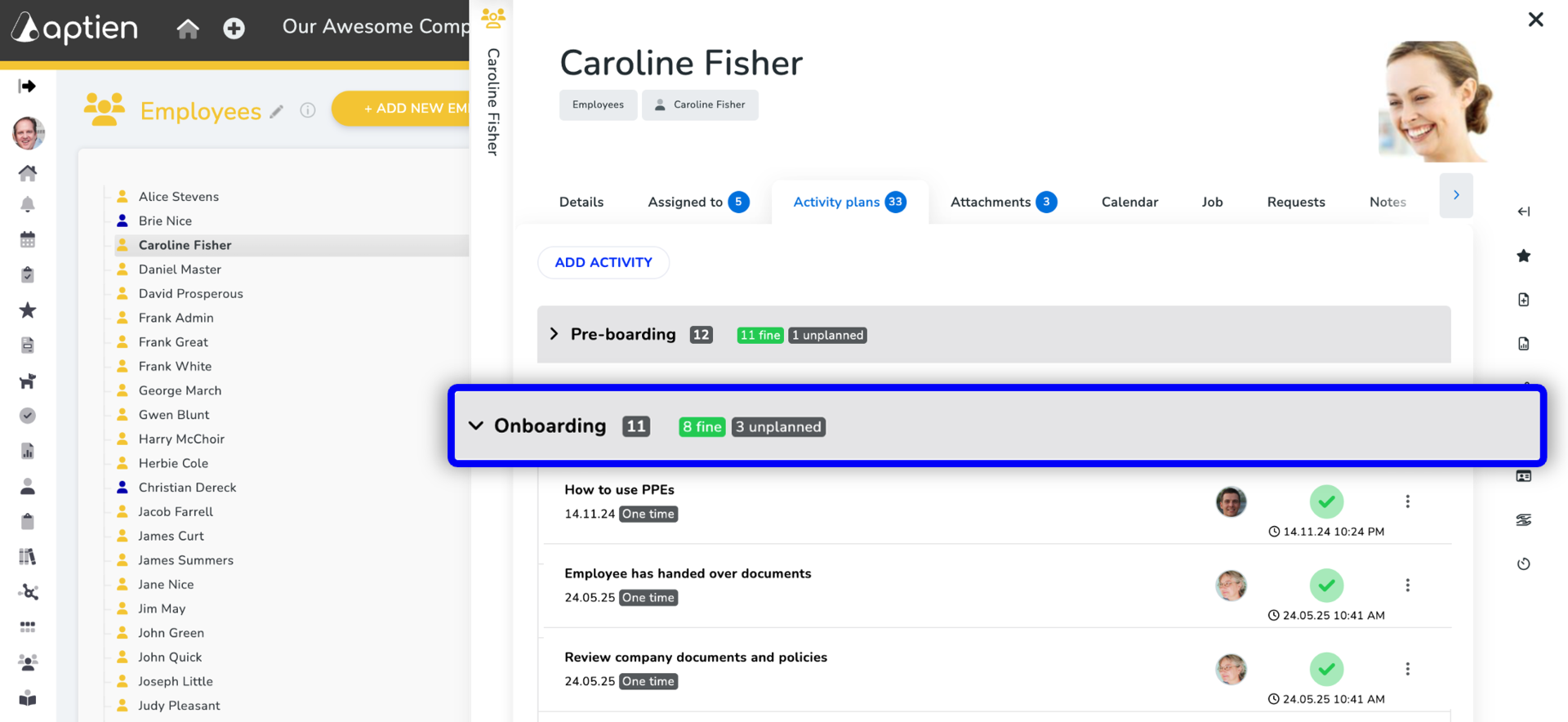
How it works in Aptien: Creating an Employee Onboarding Checklist
- In Aptien, you can build a custom onboarding checklist for new hires, and
- When a new employee starts, you can schedule each task, assign it to team members, and track progress.