Collecting Company Property at the End of Employment
When an employee leaves the company, they must return all company-issued equipment and materials. This typically includes:
- Electronic Devices: Laptops, desktops, tablets, smartphones, and any other company-issued devices.
- Access and Security Items: Office keys, key fobs, access cards, ID badges, and security tokens.
- Company Property: Tools, uniforms, credit cards, parking passes, and any other company-owned items.
- Confidential Information: Any confidential, proprietary, or customer data in any form (paper or electronic).
List of Company Property and Work Equipment to Return
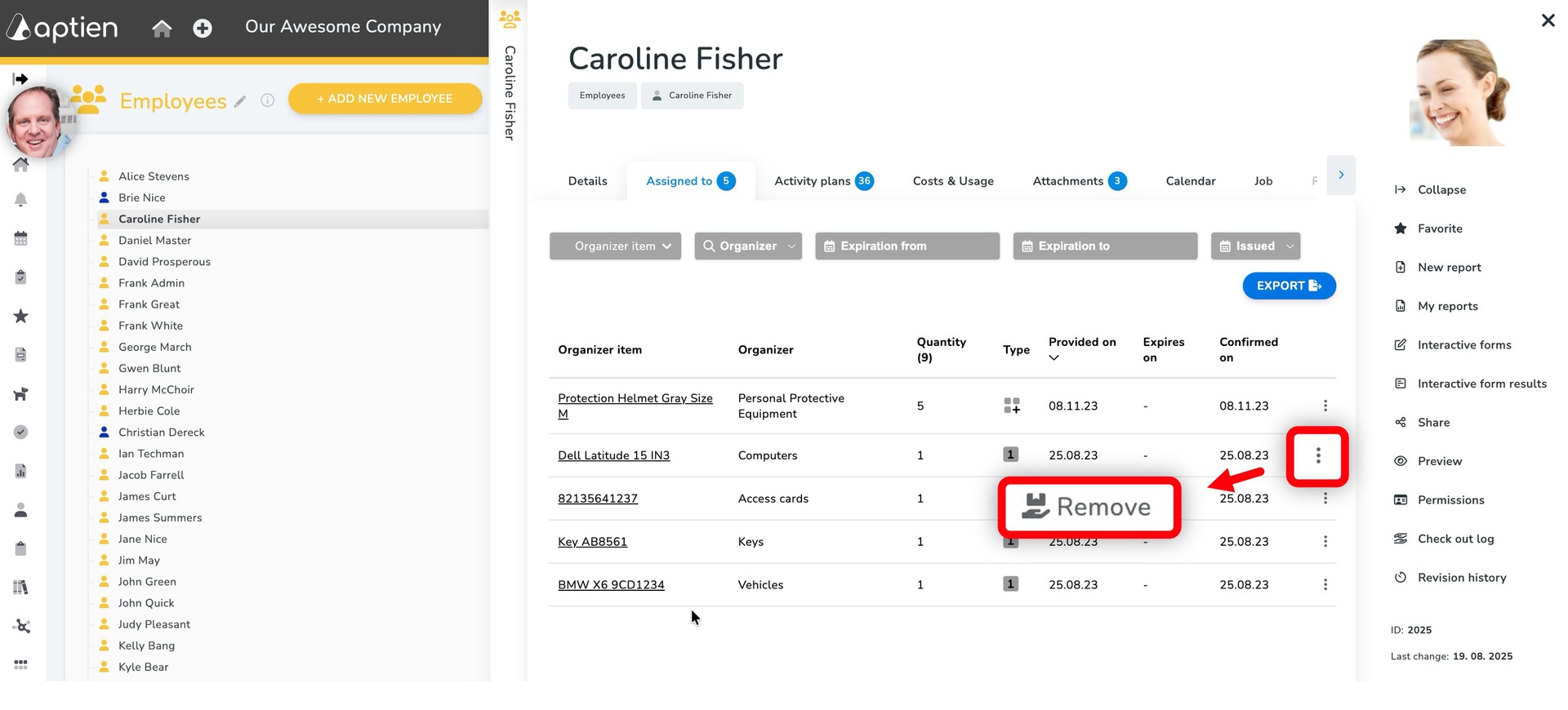
- On the employee's profile, under the "Assigned to" tab, you will find a list of the employee's work equipment

How to Take Back Work Equipment from Employees
- Open the Employee Organizer
- Select the specific employee and go to the "Assigned to" tab
- As the receiving person, find the work equipment you want to return (for example, a computer)
- Click on the three dots next to it and select the "Remove" button
- The employee returns the item and optionally confirms it on the display with their signature
If You Need Paper, That Works Too
There may be situations where you need to use paper forms because digital submission isn't possible. Even in this situation, we can simplify your processes.
- For paper handovers, use a printed form
- The form will automatically populate information you don't want to rewrite