How to link and edit Excel spreadsheets (Cloud & Local Storage)
If you want to keep your Excel sheets editable for your team or save your Aptien storage space, use the Add Link option. This feature connects Aptien directly to files stored on your cloud drives or local network.It is the best way to collaborate on spreadsheets in real time without creating duplicate file versions. Instead of downloading, editing, and re-uploading, everyone opens the exact same file from its original location.You can use this to link live documents from Cloud Storages (like OneDrive, SharePoint, Google Drive, iCloud) or Local NAS Servers and shared network drives (FTP)

Why Link Instead of Upload?
- Save Storage: Keep your Aptien data usage low.
- Real-time Collaboration: Multiple people can edit the Excel sheet simultaneously.
- No Duplicates: Eliminate version confusion (e.g., Report_v2_final.xlsx).
How to Link Your Excel Spreadsheet
- Open the relevant organizer in Aptien.
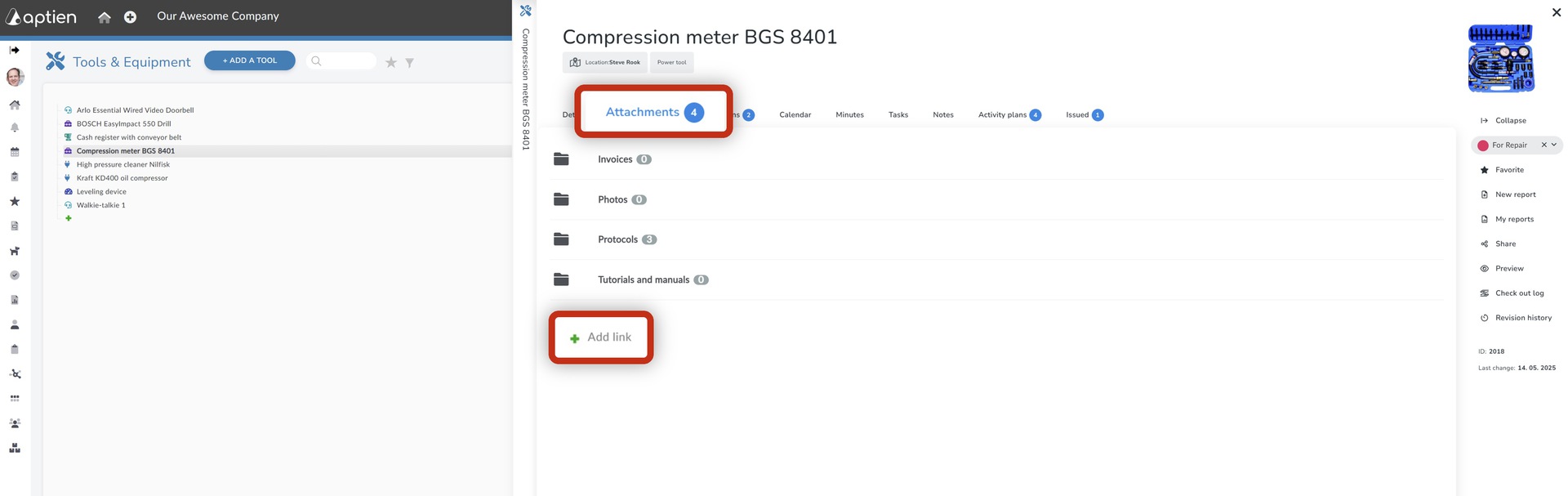
- Select the desired item from the list, open its detail card, and navigate to the "Attachments" tab. click on the "Add Link" button.
- Go to your cloud storage (e.g., OneDrive, SharePoint, Google Drive) and copy the sharing URL for the document you wish to link.
- Before pasting, ensure the sharing permissions for the URL are set to "Anyone with the link can edit" or "Shared with your team".
- A new window or field will appear. Paste the copied URL into the designated "URL" field.
- Provide a descriptive name for the link (e.g., Project Budget - Live Edit) in the "Name" or "Title" field.
- Click "Save" or "Confirm" to attach the live link to your item's attachments.
Supported Services
Cloud Storages
- Microsoft SharePoint
- Google OneDrive
- Google Sheets
- Google Drive
- iCloud
- Dropbox
- Box
- any else Cloud Storage providing share link
Local NAS servers (on-prem)
- Local NAS servers,
- shared network drives (FTP)
Frequently Asked Questions
- Can I edit the Excel file directly inside Aptien? (Explain that clicking the link opens it in the default cloud editor like Excel Online or Google Sheets).
- Who can see the file contents? (Explain that file permissions are managed by their cloud provider, not Aptien).